
Client Ready Trademark Updates: a practical Madrid portfolio workflow
A practical page for Madrid System professionals who need faster review without losing the official-record proof layer.
Open the app, add an IRN and review Madrid events, countries, dates and proof links in one workspace.
A practical page for Madrid System professionals who need faster review without losing the official-record proof layer.
Why professionals use this workflow
Use this workflow to turn client ready trademark updates into a repeatable Madrid System review routine.
The manual workflow today
A professional opens Madrid Monitor, searches or reopens the relevant records, checks events and country status, copies dates, looks for proof, then translates that work into a client or internal update. That workflow is reliable but slow when repeated across a portfolio.
The Madrid Radar workflow
- Add the relevant IRNs or portfolio set.
- Review events, countries and refusal-related updates in one workspace.
- Open WIPO proof links only where review is needed.
- Prepare a structured update with the relevant date, country and event context.
- Verify decisive legal points in the official record before action.
What this saves
The product does not remove legal analysis. It removes repeated navigation, copying and re-checking around the same official records.
Example output
“IRN [number]: relevant Madrid event detected for [country]. Review the WIPO proof link, confirm the official record and decide whether local action or client reporting is needed.”
Responsible use
Madrid Radar is a workflow layer for professional review of public Madrid System records. It helps organise events, dates, countries and proof links, while the official WIPO record remains the source to verify before legal action.
Start in the app
Start free with 20 cases and test this workflow on a real Madrid portfolio.
FAQ
Is this page about replacing Madrid Monitor? No. It is about a faster workflow around official public records. Who benefits most? Professionals who repeat the same Madrid review across many records. What should still be done manually? Final legal verification and client advice.
How this appears inside Madrid Radar
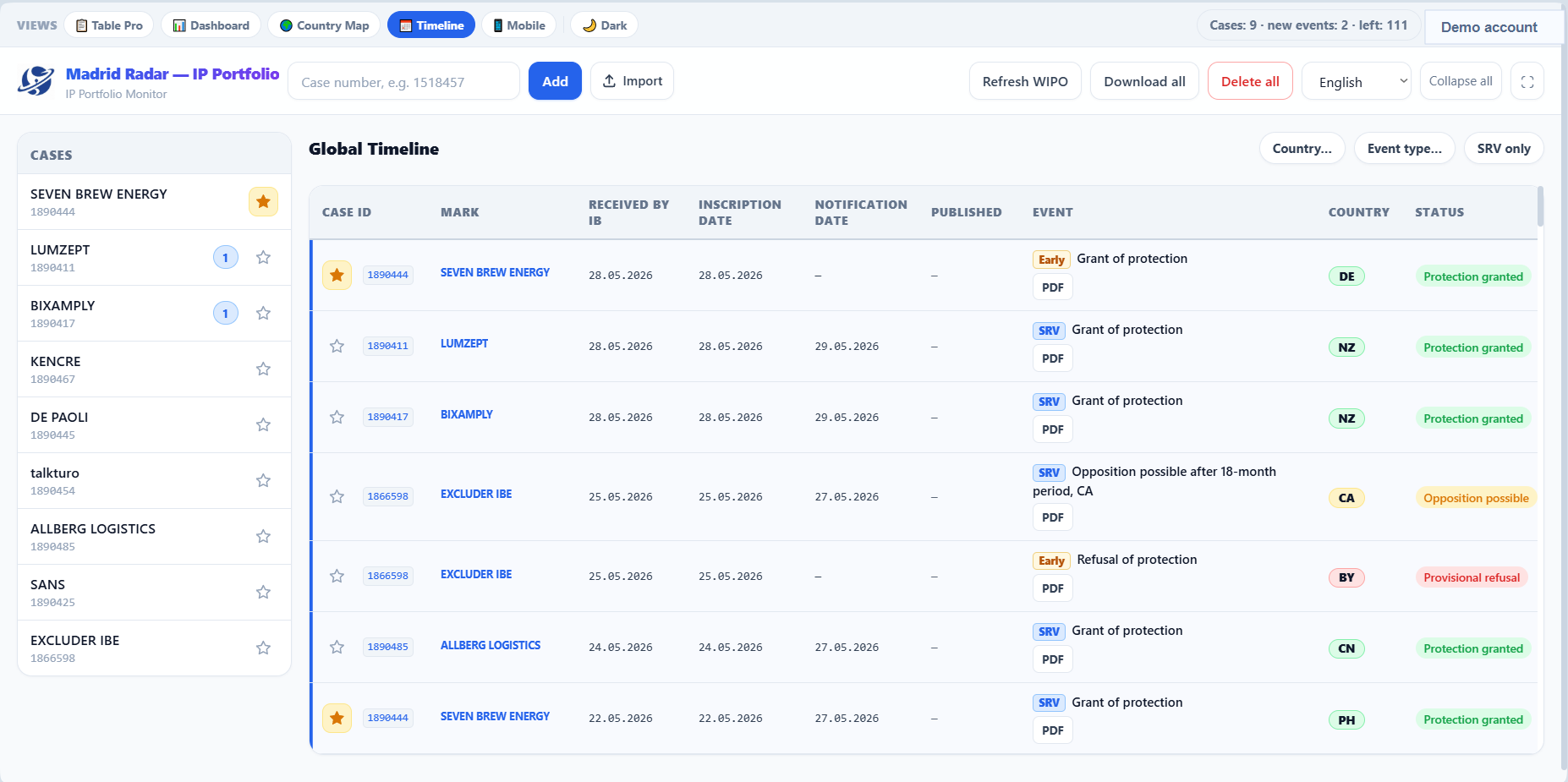
The product view below is a real app screenshot from the demo workspace. It shows the kind of working surface a prospect should expect after opening the app and adding Madrid IRNs.
Related next steps
Use these pages to move from search intent into product evaluation, pricing, data-source review or legal boundaries.
FAQ
How does this page help a professional workflow?
It helps teams reduce manual checking and organize public Madrid System information into a faster review workflow around Client-ready trademark updates.
What should I do next for Client-ready trademark updates?
Start free with 20 cases, add a Madrid IRN and review client-ready trademark updates value in the app.
Who is the best fit for Client-ready trademark updates?
Trademark attorneys, IP law firms, in-house IP teams, brand owners and portfolio managers who regularly work with Madrid System records and need client-ready trademark updates context.
Start free and test this workflow on real Madrid cases
Open the app, add an IRN once and review events, countries, refusals, dates and proof links before deciding whether Pro is useful for the portfolio.