
Explore a populated Madrid Radar portfolio
Open a populated English-language portfolio, inspect the current product, then remove the examples or add your own Madrid IRNs.
How to generate this in the app
Create an account, add your first Madrid IRN, review the timeline and country status, then use the structured output for portfolio review or client-ready updates.
1. Start free
Open the app and monitor up to 20 Madrid cases without a sales call.
2. Add IRN
Add a Madrid international registration number once and let the workspace organize the record context.
3. Review value
Check events, countries, refusals, dates and proof links in one dashboard.
4. Upgrade if needed
Try Pro for 14 days when the portfolio needs 120 monitored cases and deeper review.
What the portfolio update includes
- IRN, mark, holder and representative
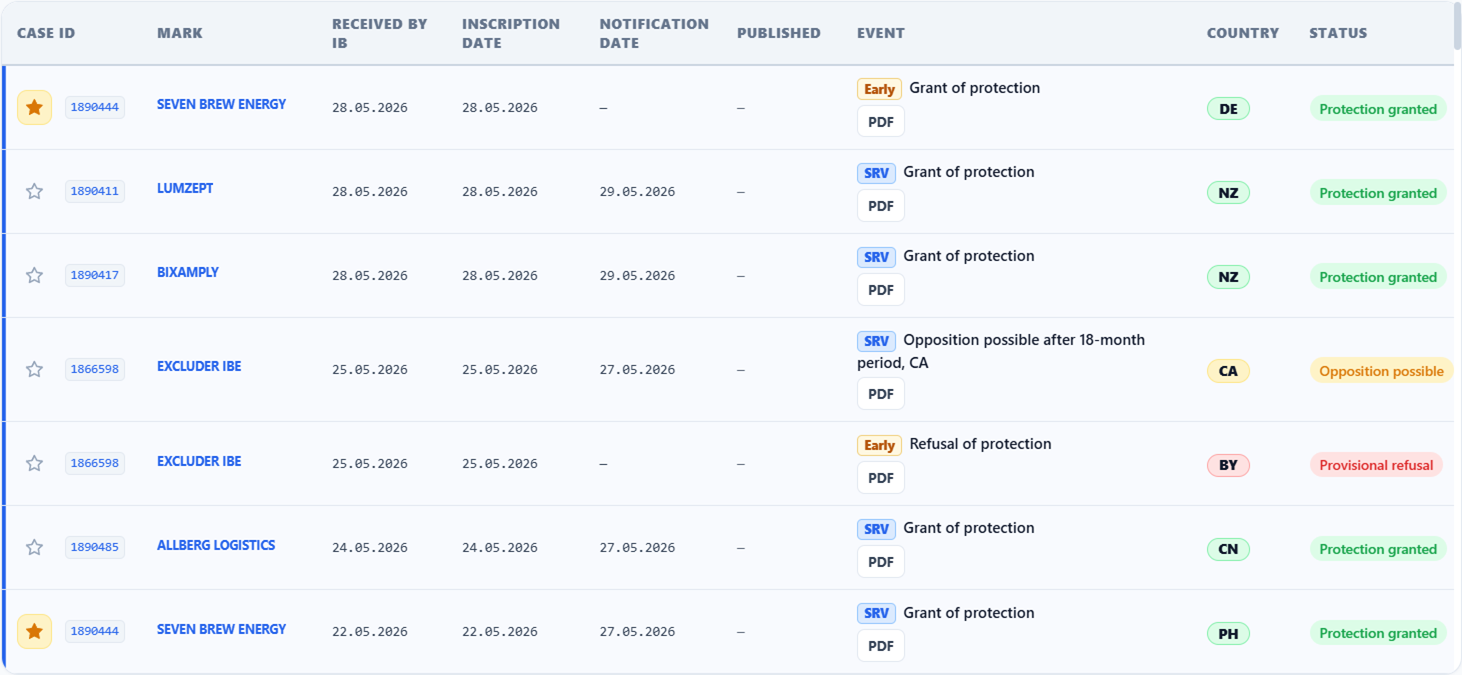
- Designation country and latest visible event
- Provisional refusal context when available in public records
- Recorded, notification and publication dates where available
- WIPO proof links and short review notes
Real report source surface
The screenshot below shows the real timeline/report surface from the demo workspace: event rows, countries, statuses and PDF actions that support a client-ready portfolio update.
What happens next
After reviewing the demo output, the natural next step is to open the app, add your first IRN and see the working value on your own Madrid portfolio.